 Clocksmith
Your Mac runs things on a schedule.
Now you can actually see them.
你的 Mac 每天默默在跑排程,
現在終於看得見了。
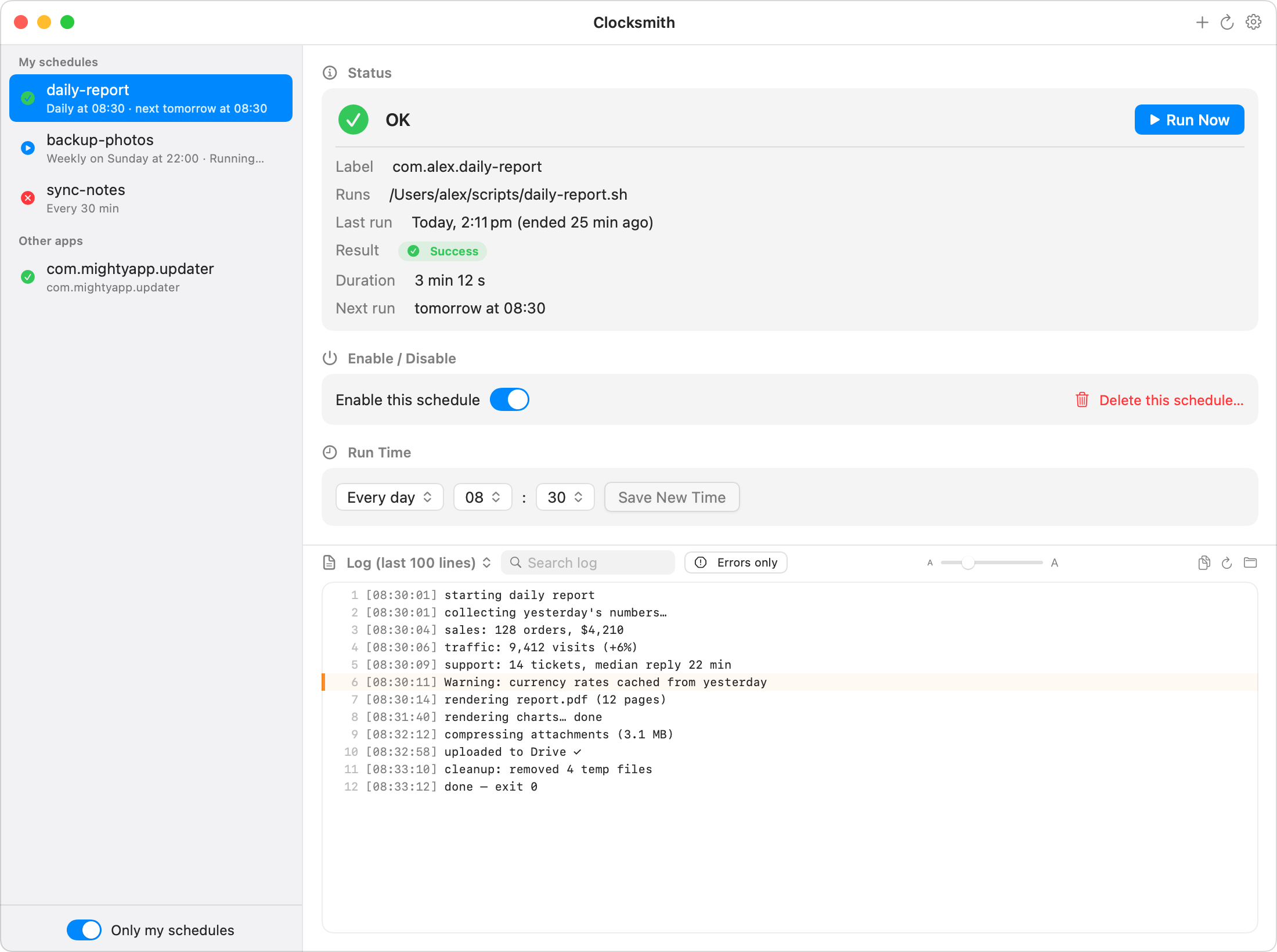
Scripts, backups, AI agents, reports — anything scheduled on your Mac with launchd. Clocksmith shows when each job last ran, whether it succeeded, and lets you run, pause, or reschedule it. No Terminal required.
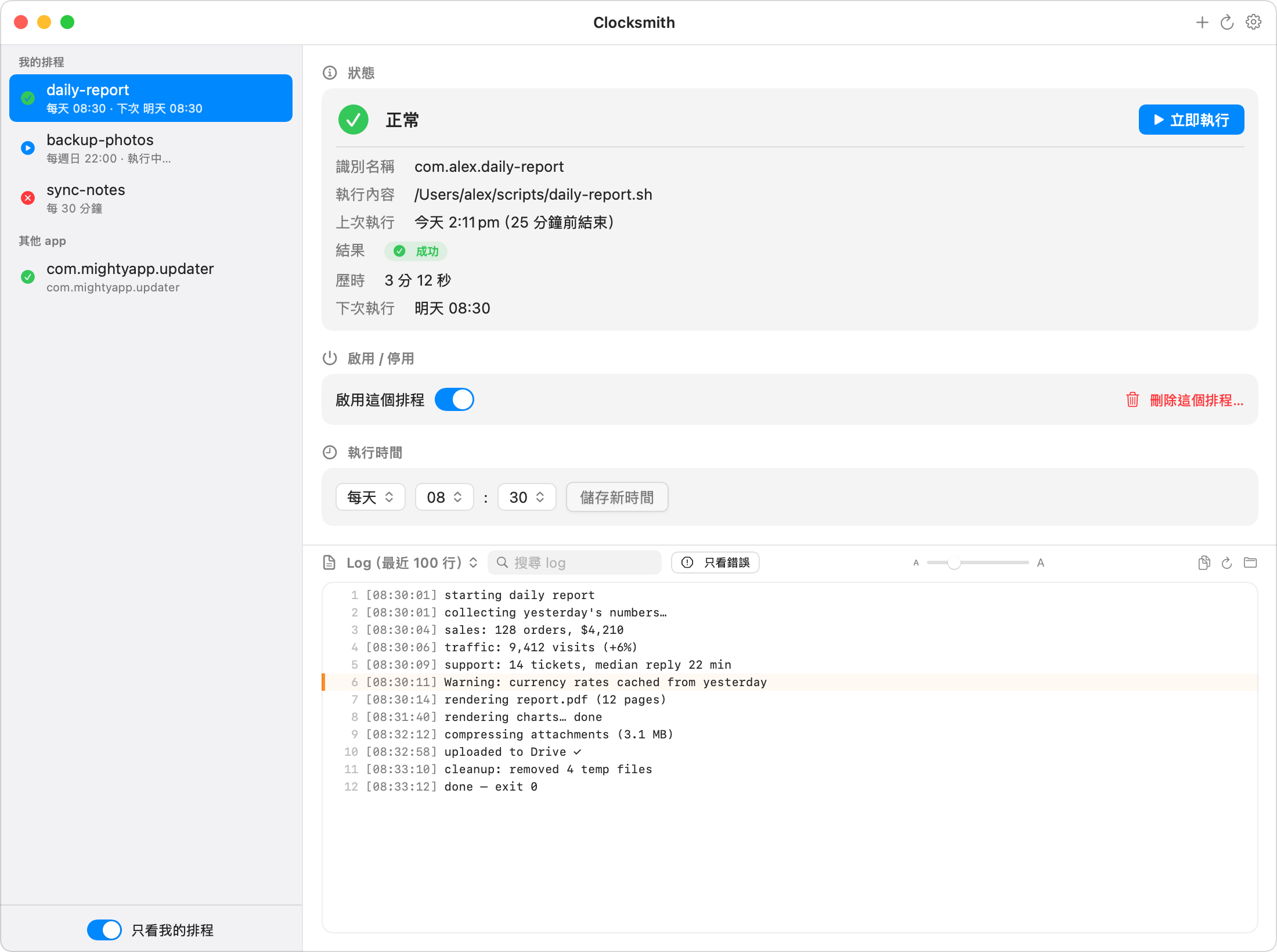
腳本、備份、AI 自動任務、每日報表——只要是 Mac 上排程執行的工作, Clocksmith 都讓你一目了然:上次幾點跑的、成功還是失敗, 還能隨時手動執行、暫停,或直接改時間。全程不用碰終端機。
Download — free 7-day trial 下載 App — 免費試用 7 天 Buy $4.99 購買 US$4.99 Full-featured trial, no signup · then $4.99 one-time · macOS 14+ · Notarized by Apple 試用功能全開、免註冊・之後 US$4.99 一次買斷・macOS 14 以上・已通過 Apple 公證New in 1.4: green means verified →1.4 新功能:綠燈值得信任 →
What it does
它能幫你做什麼
See every scheduled job
所有排程一目了然
Everything in your LaunchAgents — yours and third-party, even agents apps register invisibly — with live status: running, verified, needs attention, failed, or disabled.
不管是你自己建的、其他軟體裝的,甚至 app 藏在自己包裡註冊的排程,全部列出來。狀態即時更新:執行中、已驗證、需要注意、失敗、已停用,一眼分清楚。
Green means verified
綠燈=有證據的正常
Clocksmith reconciles each job's schedule against run history rebuilt from the system log. Green is earned by evidence — and a run that silently never happened (Mac was off?) gets flagged orange, with the reason and the receipts.
Clocksmith 會拿排程表跟系統日誌重建的執行紀錄「對帳」:綠燈是有證據才給的。該跑而沒跑的(電腦關機錯過了?)會亮橘燈,附上原因和依據,再也不會默默消失。
Run, pause, reschedule
想跑就跑,想改就改
Create a new job in one small form, run it now, toggle it on/off, or reschedule it (daily / weekly / every N minutes) — with automatic config backup before every change.
用一張小表單就能建立新排程;也能立即執行、一鍵開關、改成每天/每週/每 N 分鐘執行——每次修改前都會自動備份設定檔,改壞了也救得回來。
AI explains the failure
看不懂錯誤?丟給 AI
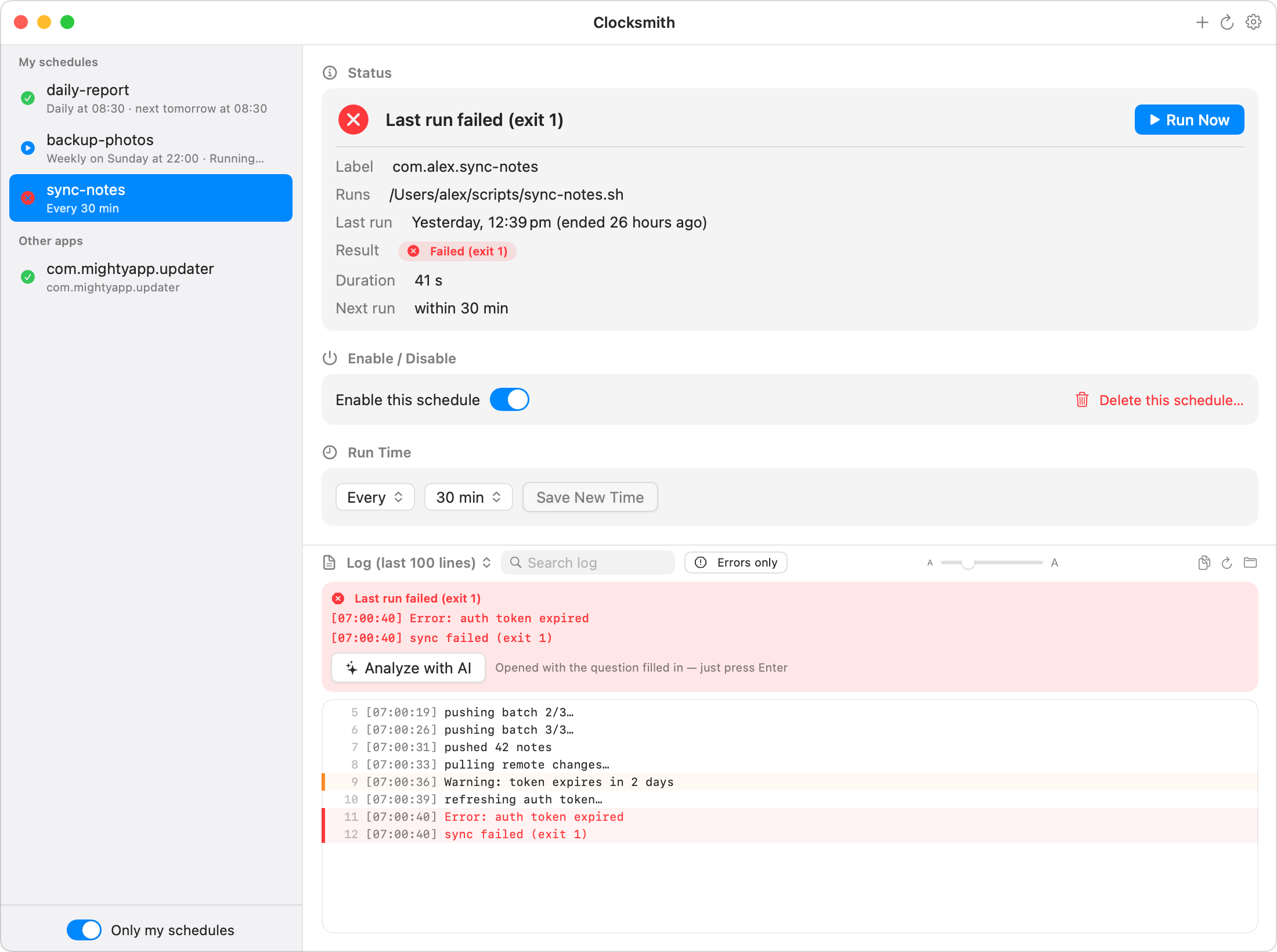
When a job fails, error lines light up red with a plain-language summary banner — and one click hands the log to ChatGPT, Claude, or Gemini, question prefilled, using your own account. The app itself sends nothing anywhere.
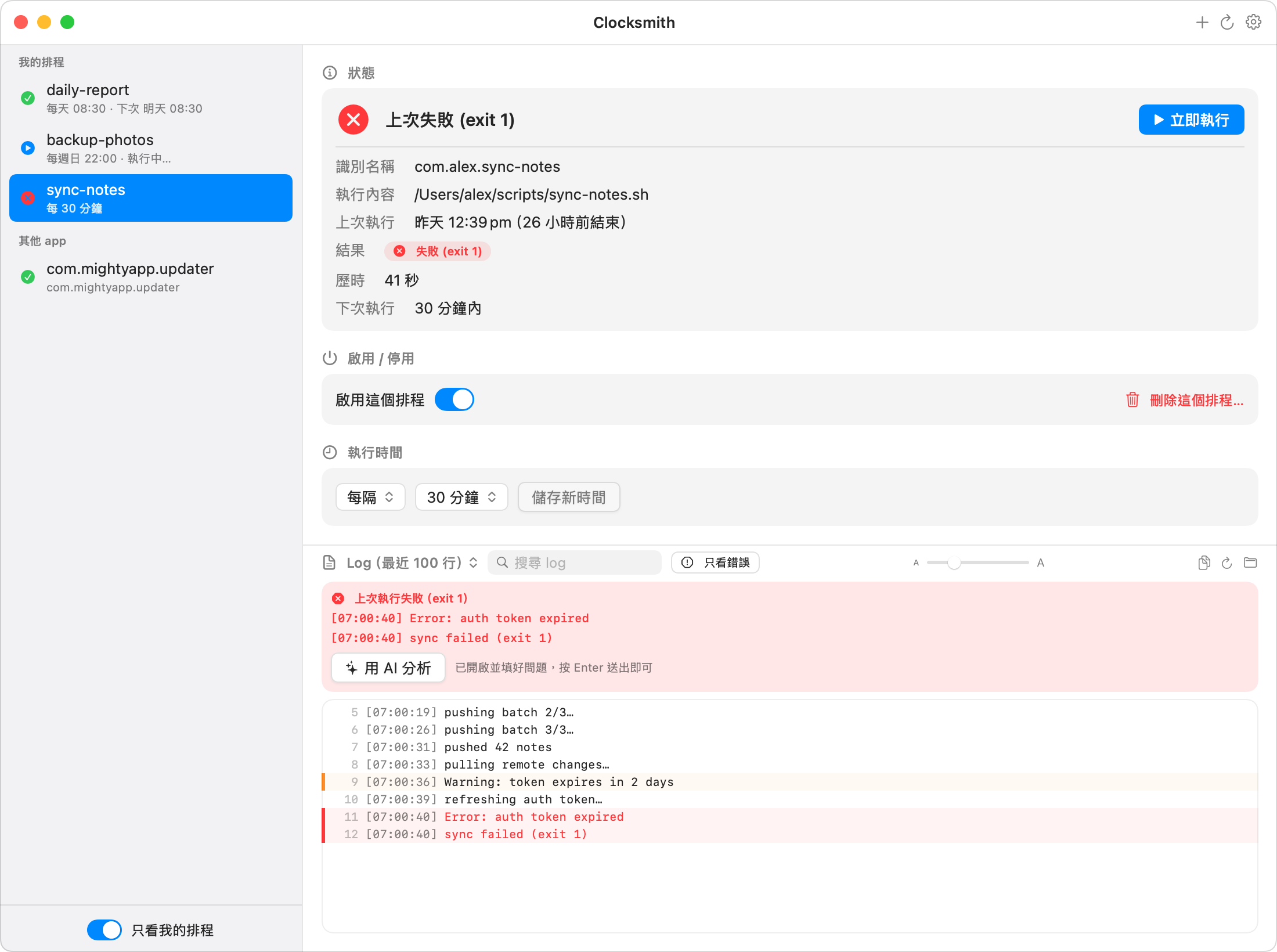
排程失敗時,log 裡的錯誤行會標紅並掛上失敗橫幅;再按一下「用 AI 分析」,就會幫你開好 ChatGPT/Claude/Gemini 並把問題填好,用你自己的帳號。App 本身不會把任何資料傳出去。
Safe by design
安全擺第一
Backup → edit → verify → auto-restore on failure. Third-party jobs need explicit confirmation. No data ever leaves your Mac.
每次修改都是「備份 → 寫入 → 驗證」,失敗自動還原。要動到其他軟體的排程會先跟你確認。你的資料完全不會離開你的 Mac。
Pricing
價格
- ✓ Free 7-day trial, full-featured
- ✓ 免費試用 7 天,功能全開
- ✓ All features, no subscription
- ✓ 功能全開,沒有訂閱制
- ✓ Signed & notarized by Apple
- ✓ Apple 簽名+公證
- ✓ Free updates for 1.x
- ✓ 1.x 版本免費更新
FAQ
常見問題
Why isn't this on the Mac App Store?為什麼不在 Mac App Store 上架?
App Store apps must run in a sandbox that forbids managing launchd jobs — the entire point of Clocksmith. So it's sold directly instead, signed and notarized by Apple like any trustworthy Mac app.
App Store 規定上架的 app 必須關進「沙盒」,而沙盒剛好禁止管理 launchd 排程——這正是 Clocksmith 的核心功能。所以改成官網直售,但一樣經過 Apple 的簽名與公證把關,安全性不打折。
What are "scheduled jobs" exactly?「排程任務」到底是什麼?
macOS runs background tasks via launchd, configured by plist files in ~/Library/LaunchAgents. Scripts you (or your AI tools) set up to run daily, app updaters, sync helpers — Clocksmith reads and manages the user-level ones.
macOS 內建一套叫 launchd 的排程系統,設定檔放在 ~/Library/LaunchAgents。你(或你的 AI 工具)設定的每日腳本、軟體的自動更新程式、同步小工具,都是靠它在背景執行。Clocksmith 負責幫你看管其中「使用者層級」的排程。
Does it collect any data?會收集我的資料嗎?
No. Clocksmith has no analytics and no account. The only network request it ever makes is a one-time license activation when you enter your key — the free trial makes zero network calls. Everything else stays on your Mac.
完全不會。沒有任何追蹤分析、也不用註冊帳號。它唯一會連網的一次,是你輸入序號時的啟用驗證——試用期間完全不連網。其他所有東西都只留在你的 Mac 上。
Can it edit any schedule?所有排程都能編輯嗎?
It creates and edits daily, weekly, and every-N-minutes schedules safely, with automatic backups. Anything it can't rewrite losslessly (file watchers, multiple times a day, monthly rules) is shown read-only rather than risk breaking it.
每天、每週、每 N 分鐘的排程都能放心建立與編輯(改之前會自動備份)。無法完整保留原設定的(監看檔案變化、一天多個時段、按月排程)會以唯讀方式顯示,避免不小心改壞。
What happens when the trial ends?試用期結束會怎樣?
The app goes read-only: you can still see every schedule and its current status — we never hold your schedules hostage (they keep running; macOS runs them, not us). Running, editing, creating, run history, and log viewing unlock with a license.
App 會變成唯讀:排程清單和目前狀態永遠看得到——我們絕不綁架你的排程(排程本來就由 macOS 執行,不會因此停擺)。立即執行、修改、建立、執行歷史和 log 檢視,輸入序號後解鎖。
System requirements?系統需求?
macOS 14 (Sonoma) or later. Native Swift app, Apple Silicon & Intel.
macOS 14(Sonoma)以上。原生 Swift 開發,Apple Silicon 和 Intel 都支援。